Oracle PeopleSoft Archival Playbook - Part 1
Foundation for Safe Oracle PeopleSoft Decommissioning
Most Oracle PeopleSoft retirement projects do not fail because the data cannot be exported. They fail because the archive is not usable, trusted, or ready for audit.
Architecture and data migration choices that help retire Oracle PeopleSoft without losing historical inquiry, audit evidence, reporting access, or the business context needed after migration.
Build the Foundation Before Retiring PeopleSoft
The goal of Oracle PeopleSoft archival is not just to move data. The goal is to make Oracle PeopleSoft unnecessary for historical inquiry.
Part 1 defines that foundation: what history to preserve, what risks to check before migration, where the archive runs, and how the data will be validated. The companion playbooks turn those decisions into OCI build steps and DBA Data Pump steps. Part 2 moves into the user-facing archive.
Start With Archive Discovery
Archive projects fail early when the team starts with export scripts before agreeing what history must remain usable. The first step is discovery: build a clear inventory of the source Oracle PeopleSoft landscape before the DBA sizes the target, the infrastructure team builds OCI, or the business signs off on scope. This prevents the common archive failure: moving rows while missing the modules, custom schemas, attachments, reports, or users that make the history useful later.
Capture the PeopleSoft application release, PeopleTools release, database version, database size, modules in scope, custom schemas, custom reports, attachment volume, current hosting model, and expected archive user population. Also confirm whether your organization already has an OCI tenancy or whether the archive project must include new OCI foundation work.
Discovery Checklist
Copy this table into Excel or Google Sheets before the first technical workshop.
| Area | Information to Capture | Why It Matters |
|---|---|---|
| PeopleSoft application release | PeopleTools release, application pillars, image level, current patch level | Drives compatibility, export planning, and archive assumptions. |
| Database version | Source database release, CDB/PDB or non-CDB | Affects CPAT findings, Data Pump options, and Autonomous Database readiness. |
| Database size | Total size, schema size, growth, largest tables | Impacts export duration, transfer method, Autonomous Database sizing, and cost. |
| Modules in scope | HCM, Benefits, Payroll, GL, AP, AR, Billing, Purchasing, Inventory, Order Management, Project Costing, Campus Solutions, custom modules | Defines reporting, validation, and business sign-off scope. Campus Solutions should remain discovery scope until prebuilt Campus reports are added. |
| Effective-dated data | EFFDT, EFFSEQ, effective status and current-row rules | Prevents reports from returning incorrect historical or duplicate records. |
| PeopleSoft configuration | Business Units, SetIDs, record groups, ChartFields and configured labels | Preserves reporting context and supports correct joins and authorization. |
| Custom schemas | Custom schemas, custom tables, custom views, extensions | Prevents losing business-critical custom history. |
| Custom reports | Most-used reports, SQL logic, parameters, owners | Helps prioritize APEX reports and validation scenarios. |
| Attachments | Volume, storage model, document categories, largest files, repositories, URL definitions, join keys | Determines extraction, storage, download, and audit design. |
| Archive users | Approximate users, departments, roles, sensitive data groups | Drives SSO, authorization, report access, and support model. |
| Current hosting | On-premise, OCI, managed hosting, hybrid | Determines network, transfer, and retirement sequencing. |
| OCI tenancy | Existing tenancy, compartments, IAM, region, networking standards | Identifies whether OCI foundation work is required. |
PeopleSoft attachments may be stored in database records, file servers, FTP or SFTP repositories, or other locations defined through PeopleSoft URL definitions. Inventory each attachment record, URL definition, storage table, repository type, join key, and file-retrieval method before designing the archive.
Find Compatibility Risk Before Design Is Locked
A migration plan looks clean until the source database exposes objects, settings, or character-set behavior that Oracle Autonomous AI Database, using the Lakehouse workload, with Oracle APEX, handles differently. Run Oracle Cloud Premigration Advisor Tool (CPAT) before finalizing the archive migration plan so those findings become design decisions, not late import surprises. Oracle's CPAT documentation describes CPAT as a migration assistant for evaluating source database metadata before moving data to Oracle Autonomous AI Database.
Do not treat CPAT findings as a generic database-clone checklist. Review each finding against the agreed archive scope, reporting needs, attachments, validation, and audit evidence. Some findings require remediation; others may only need a documented archive exception.
What the CPAT review should answer
- Which findings affect archive-scope tables, views, reports, or attachments?
- Which findings are runtime-only Oracle PeopleSoft behavior that can be documented as not required for historical inquiry?
- Which findings affect architecture, migration planning, validation, or audit evidence?
For the technical runbook, use the DBA Data Pump playbook .
Create a Secure Cloud Landing Zone for the Archive
A restored database on another server can leave the team with the same operational problem under a new name: patching, backups, monitoring, access control, scaling, and support for a system used mainly for historical inquiry. The archive needs a managed, private landing zone, not another legacy stack.
OCI is the reference architecture here because Autonomous Database, APEX, Object Storage, IAM, and private networking are native services that fit an Oracle PeopleSoft archive pattern. The same principles can apply when enterprise cloud strategy points to Oracle Autonomous Database through Oracle's multicloud offerings in Azure or Google Cloud.
Build the foundation in a deliberate order: governance, private connectivity, storage, Autonomous Database and APEX, identity, and monitoring. That keeps dependencies visible, failures easier to isolate, and archive cost aligned to actual usage instead of daily Oracle PeopleSoft operations.
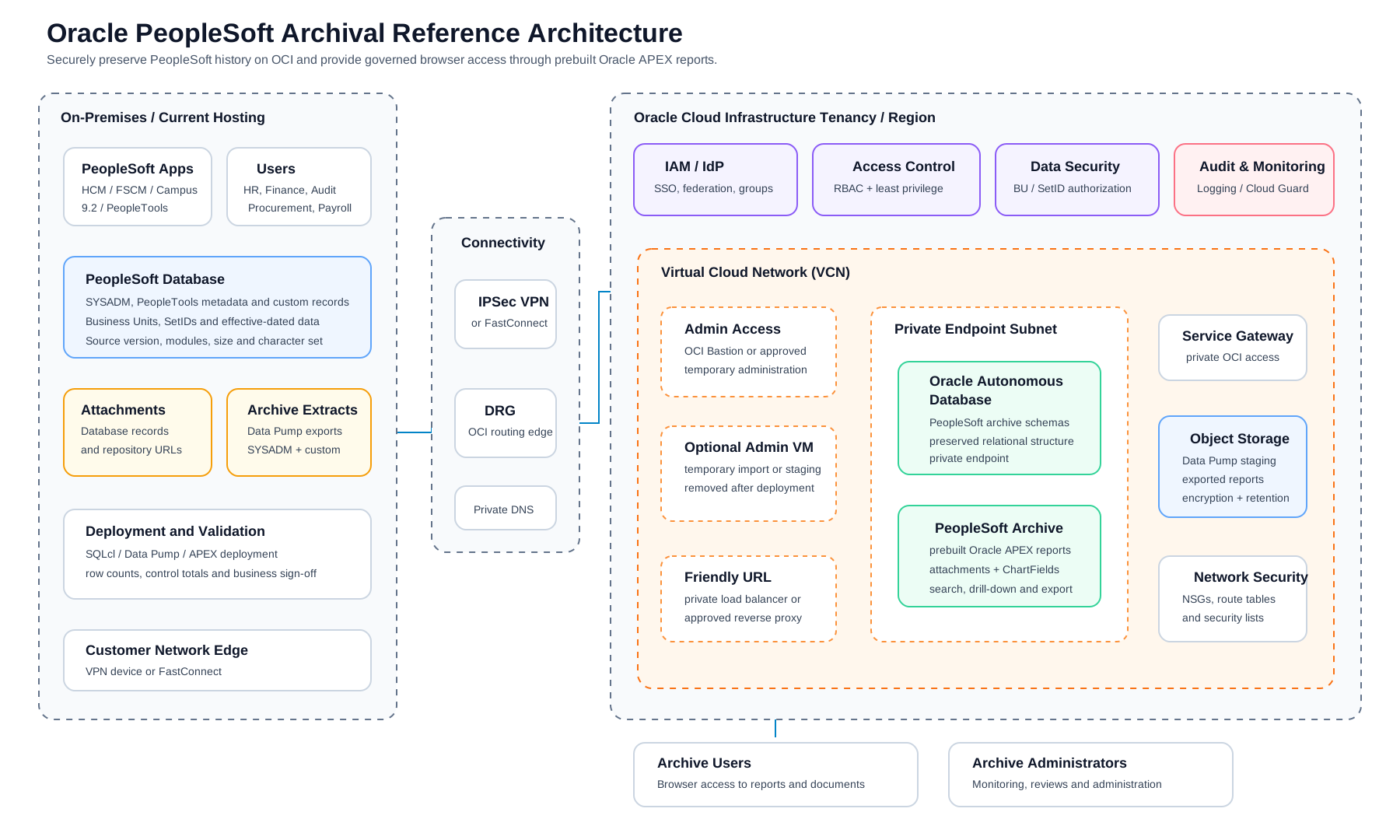
| Build Step | OCI Components | Why It Exists | Watch For |
|---|---|---|---|
| 1. Governance | Compartment, naming standard, tags | Creates a clean boundary for IAM, cost, ownership, and operations. | Do not build in the tenancy root. Agree names and tags before resources are created. |
| 2. Network And Connectivity | VCN, private subnet, DRG, VPN or FastConnect, DNS | Gives DBAs, users, and corporate systems a private path to the archive. | CIDR overlap, missing return routes, and missing private DNS are common blockers. |
| 3. Archive Storage | Object Storage, lifecycle rules, retention policy | Stores Data Pump files, migration evidence, retained exports, and attachments when they are extracted separately from PeopleSoft repositories. | Configure encryption, retention, lifecycle, and access policies before production data is uploaded. |
| 4. Archive Database And App Layer | Autonomous Database, private endpoint, wallet, APEX | Hosts imported history, archive schemas, reporting applications, and SQL validation. | Size Autonomous Database from source data and reporting needs before the migration window. |
| 5. Identity And Access | IAM policies, SSO, NSGs, business roles | Controls archive administration and access by business role, module, Business Unit, SetID, department, employee-data domain, and other required security dimensions. | Avoid broad tenancy policies, open CIDRs, and full-archive access for all users. |
| 6. Monitoring And Operations | Cloud Guard, logs, alerts, response ownership | Keeps risky configuration, public exposure, and access drift visible after go-live. | Confirm who reviews findings and how the archive is supported after handoff. |
Reference build playbook
Use the companion OCI build playbook when the infrastructure team is ready to implement the reference architecture. It includes a manual console path, a Terraform path, input tables, failure checks, and connectivity validation steps.
Open OCI build playbookProve the Archive Can Be Trusted
A Data Pump import can finish successfully and still leave the archive hard to trust. The team must be able to explain which Oracle PeopleSoft schemas moved, which objects failed, which objects were excluded, and how the target reconciles to the source.
Use CPAT findings, import logs, row counts, report comparisons, attachment checks, and business sign-off to separate real remediation from documented archive exceptions. Validation must test more than row counts. Confirm PeopleSoft business keys, effective-dated results, SetID and Business Unit relationships, financial control totals, payroll totals, attachment counts, reconstructed file sizes, and representative report results.
The archive should preserve the source relational tables and business keys needed for historical access, but it does not need to reproduce the complete PeopleSoft runtime. Unsupported or unnecessary runtime objects should be excluded or documented, while semantic reporting views provide user-friendly access.
Keep the original source export according to retention policy, and preferably long enough to support future migration of excluded or non-PeopleSoft-related data if the business later decides it is needed.
Data Pump export and import playbook for archive DBAs
Use the companion DBA playbook for source sizing, export filesystem setup, Oracle directory DDL, metadata export, data export, Object Storage upload, and archive handoff checks.
Open Data Pump playbookFrom Foundation to Usable Archive
Finance, HR, Supply Chain, Procurement, Audit, and IT do not need another schema to query; they need a secure way to find old transactions, run familiar reports, open attachments, and prove the numbers when questions come later.
Start with the reports those teams ask for most often, and validate them before Oracle PeopleSoft is retired. Oracle APEX gives the archive room to grow: interactive reports can be built with SQL, and preserved PeopleSoft metadata helps experienced analysts and DBAs extend the reporting layer when new audit or business questions come up.
For FSCM reports, preserve PeopleSoft ChartFields, customer-configured ChartField labels, and descriptions so historical accounting distributions retain their original business meaning.
That is the next layer of the archive: Oracle APEX reports, module-based navigation, attachment access, SSO authentication, authorization by business role, friendly URLs, and a support model that does not depend on keeping Oracle PeopleSoft alive.
Part 2 moves from foundation to usability after Oracle PeopleSoft is retired.